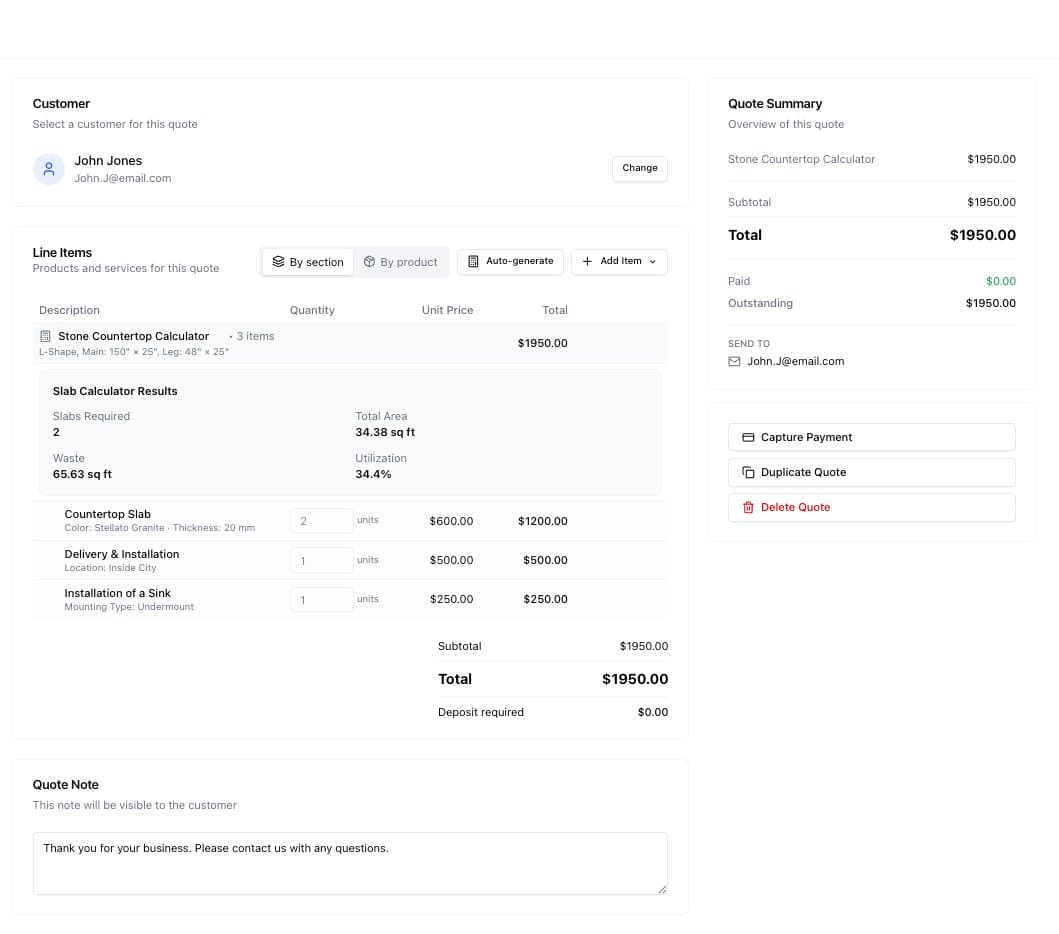
Stone fabricators face a unique challenge: quoting countertops is fundamentally different from quoting most other services. You can't just multiply square footage by a price. You need to figure out how many slabs to order, where to place seams, and how to minimize waste—all while giving customers instant, accurate pricing.
Today, we're excited to announce the Slab Calculator Module, a specialized calculator type built specifically for countertop businesses. Here's why we built it and how it works.
The Problem: Countertops Don't Fit Standard Calculators
When a homeowner wants a kitchen countertop quote, they don't think in slabs—they think in countertop shapes. "I have an L-shaped kitchen, about 10 feet on the long side, 4 feet on the short side."
But for fabricators, the real question is: How many slabs do I need?
This depends on:
- The countertop dimensions
- The shape (rectangle, L, U, with island)
- Standard slab sizes (typically 120" × 60")
- How pieces can be cut and arranged to minimize waste
- Where seams will fall
A standard calculator can handle "square footage × price per sqft." But it can't run the bin packing algorithm needed to figure out slab counts. It can't show customers how their countertop pieces fit onto slabs. It can't account for waste.
The result? Countertop businesses either:
- Give rough estimates that are often wrong
- Require manual calculation for every quote
- Use complex spreadsheets that customers can't interact with
- Avoid instant quoting entirely
We wanted to fix this.
Our Approach: Hardcode the Hard Part
Instead of trying to make a "general purpose" calculator handle bin packing (which would require a complex formula engine), we took a different approach: hardcode the complex part, use standard systems for everything else.
What's Hardcoded
Step 0: Shape Configuration
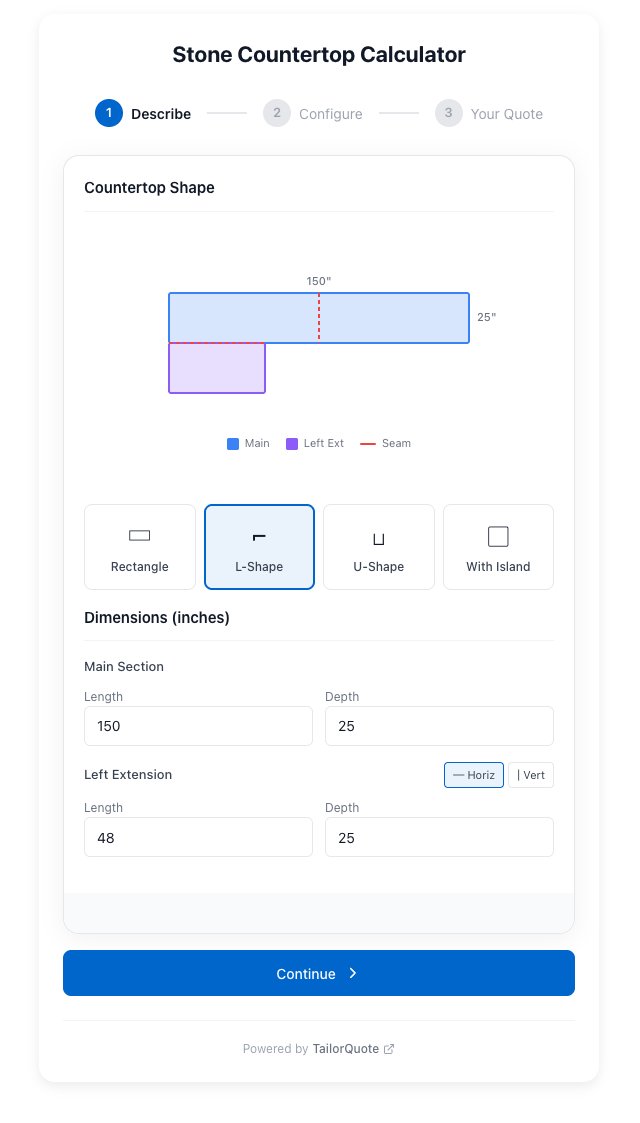
- Interactive shape selector (Rectangle, L-Shape, U-Shape, With Island)
- Dynamic dimension inputs based on shape
- Live SVG preview that updates as you type
- Bin packing algorithm that calculates slab requirements
This step outputs "M_" variables (Module outputs):
M_SLABS_NEEDED- How many slabs to orderM_TOTAL_SQFT- Total countertop areaM_WASTE_SQFT- Unused slab materialM_SHAPE- Selected shape
What's Standard
Everything after Step 0 uses our existing calculator system:
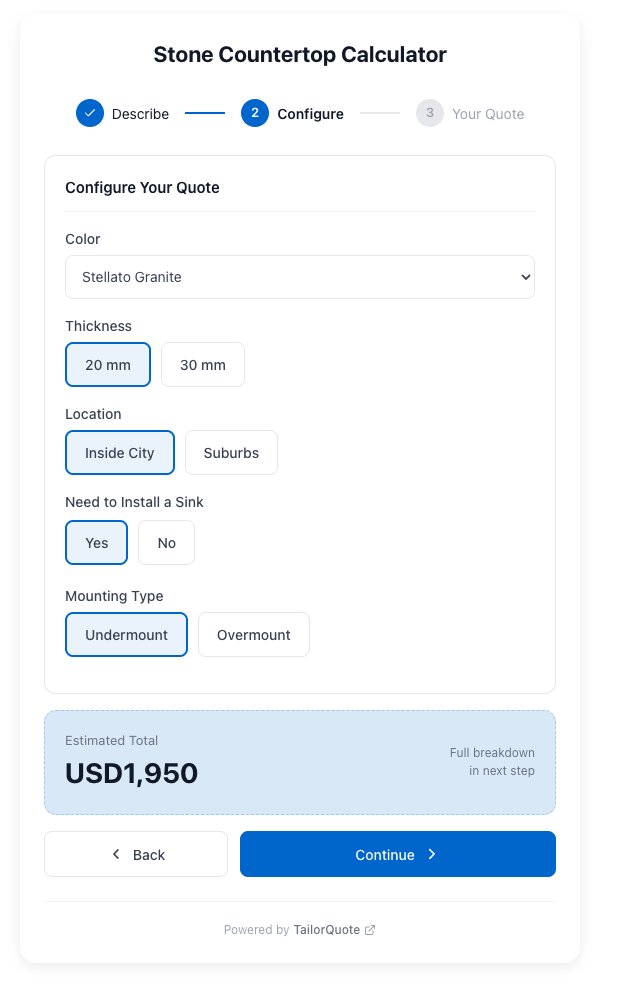
Step 1+: Material & Options
- Material selection (Granite, Quartz, Marble)
- Color options
- Thickness (2cm, 3cm)
- Edge profiles (Flat, Bullnose, Ogee, Waterfall)
- Delivery zip code
Products
- Standard product configuration
- Formulas can reference M_ variables
- Example: Slab quantity =
M_SLABS_NEEDED - Example: Fabrication quantity =
M_TOTAL_SQFT
This hybrid approach gives us the best of both worlds: specialized handling for the complex geometric calculations, familiar configuration for everything else.
How the Bin Packing Works
When a customer enters their countertop dimensions, we run a bin packing algorithm to figure out the optimal arrangement. Here's what it does:
1. Break Down the Shape
An L-shaped countertop becomes rectangular pieces:
       ┌──────────────────────┐
       │    Main Section      │
       │    120" × 25"        │
       └──┬───────────────────┘
          │ Left Leg  │
          │ 48" × 25" │
          └───────────┘
2. Try Different Arrangements
The algorithm attempts to fit pieces onto standard slabs (120" × 60") in different orientations:
- Pieces side by side
- Pieces rotated 90°
- Multiple slabs with optimal piece placement
3. Calculate Results
For each arrangement, we track:
- Total slabs needed
- Waste percentage
- Seam locations
The algorithm selects the arrangement with minimum slabs and reasonable seam placement.
4. Show the Customer
The widget displays:
- Visual preview of their countertop shape
- Slab layout showing how pieces are cut
- "2 slabs needed (45.8 sq ft, 12% waste)"
Customers understand exactly what they're getting before they ever talk to sales.
The Customer Experience
Here's what it looks like from the customer's perspective:
Step 1: Describe Your Countertop
Customers select their countertop shape and enter dimensions. The live SVG preview updates as they type, showing exactly what their countertop will look like.
Step 2: Configure Options
Standard input fields for material selection, edge profiles, and other customizations.
Step 3: See Your Quote
Itemized quote showing exactly what drives the cost: slab count, square footage, edge complexity.
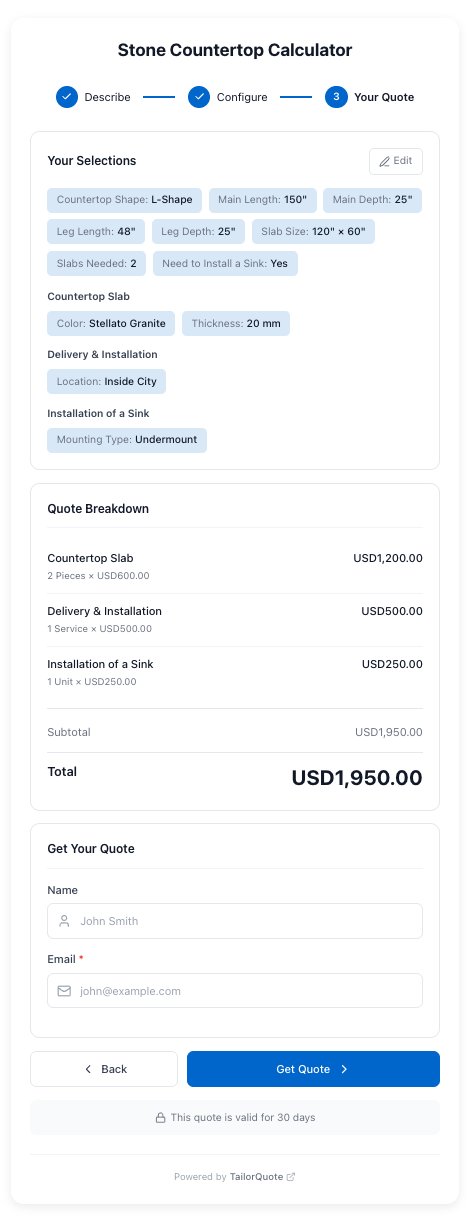
The customer sees exactly what drives the cost: slab count, square footage, edge complexity.
For Stone Fabricators: Setting It Up
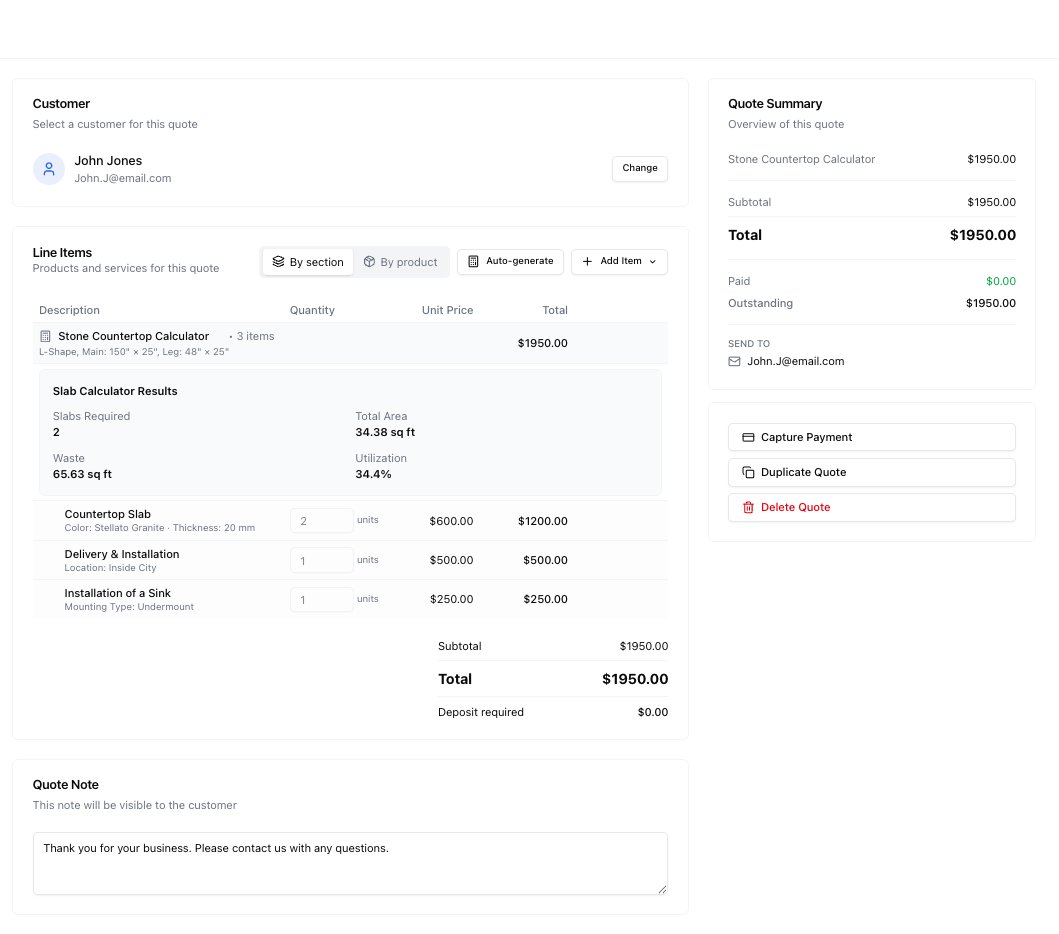
If you're a countertop business, here's how to configure the slab calculator:
1. Create a New Calculator
When creating a calculator, select "Slab Calculator" as the type. This automatically adds Step 0 with shape configuration.
2. Add Your Inputs
Configure Steps 1+ with your material options:
- Materials available
- Colors per material
- Thickness options
- Edge profiles you offer
- Any other inputs (delivery zip, rush fee, etc.)
3. Configure Products
Add products that use the M_ variables:
Stone Slab Product
- Quantity:
M_SLABS_NEEDED - Map variables to inputs (color, thickness)
- Price formula based on material and thickness
Fabrication Product
- Quantity:
M_TOTAL_SQFT - Map edge profile
- Price per sqft varies by edge complexity
Installation Product
- Quantity:
M_TOTAL_SQFT - Flat rate per sqft
Delivery Product
- Fixed quantity: 1
- Price based on zip code or distance
4. Test and Launch
Run through the calculator yourself. Verify slab counts make sense. Publish and embed on your website.
Why This Matters for Your Business
Before: Manual Slab Calculations
- Customer calls or emails with dimensions
- You pull out the calculator/spreadsheet
- Figure out piece arrangement manually
- Calculate slab count and waste
- Price out materials and labor
- Send quote (hours or days later)
- Customer may have already found someone faster
After: Instant Automated Quotes
- Customer uses calculator on your website
- Selects shape, enters dimensions
- Algorithm calculates optimal slab arrangement
- Instant quote with accurate slab counts
- Customer submits, you get qualified lead
- Time: 3 minutes, no manual work
The Numbers
- Quote time: Days → Minutes
- Manual effort: 30+ mins → 0
- Lead quality: Better (customers self-qualify with real dimensions)
- Close rate: Higher (instant gratification)
- Accuracy: Consistent (algorithm vs. manual math)
What's Next
This is our first "module" in TailorQuote—specialized calculator functionality for specific industries. The slab calculator demonstrates our approach: hardcode the complex part, standardize everything else.
We're already thinking about other modules:
- Fencing module: Length × height with gate placement
- Flooring module: Room dimensions with waste calculation
- Cabinetry module: Kitchen layout configuration
- Solar module: Roof area with panel layout
Each would follow the same pattern: a specialized Step 0 that handles industry-specific geometry, feeding into standard products and pricing.
Try It Yourself
If you're a countertop business, the slab calculator module is available now. Create a new calculator and select "Slab Calculator" as the type.
If you're in a different industry and think a specialized module would help your business, let us know. We're building these based on customer demand.
The goal is simple: every service business should be able to give instant, accurate quotes—no matter how complex the calculations.
TailorQuote is calculator-first quoting software for service businesses. We help you turn website visitors into customers with interactive quotes that work 24/7. Start risk-free and see the difference instant pricing makes.